See the whole store in one place
Spend, sales, products, organic demand and site quality appear in one view.
Uplify Ads Assistant brings Google Ads, GA4, Merchant Center and site data into one workspace. Nestor AI explains what changed, what the data supports and what to review next.
Free connection · No card · No changes without your approval
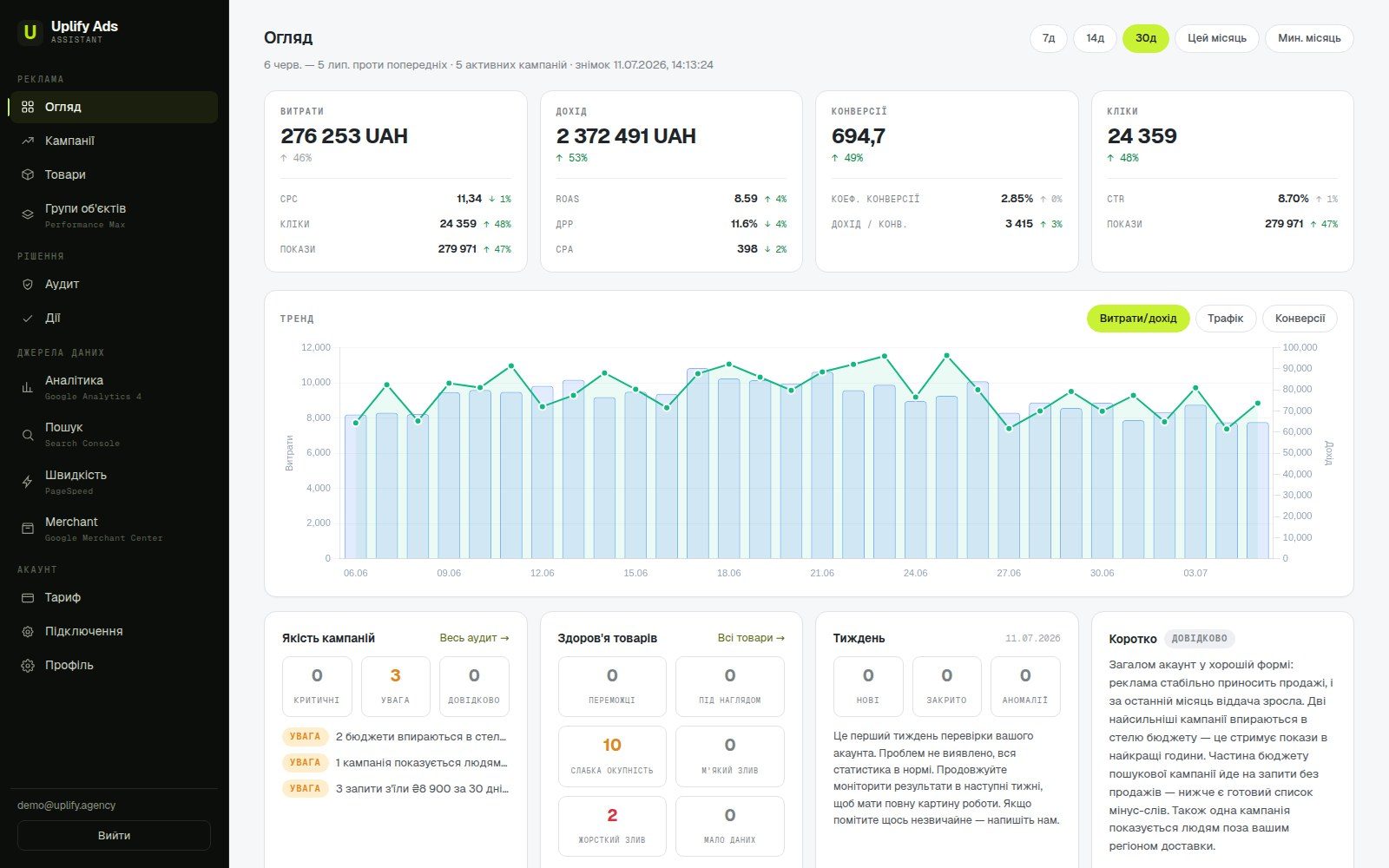
A store owner does not need another set of disconnected reports. You need to know why revenue changed, which products spend without sales, whether conversions are tracked correctly and what to discuss with your team today.
Nestor AI analyzes the accounts and period you choose, separates facts from assumptions, shows where the data is incomplete and never changes the account without your approval.
Why did qualified conversions fall in the last 30 days, and what should I do next?
 Nestor AIData checked
Nestor AI separates recorded facts from possible explanations, shows the affected campaigns and SKUs, and prepares a change for your review instead of applying it automatically.
Uplify Ads Assistant shows the analysis, explanation and proposed change separately. You can check every conclusion, and nothing changes in the account without you.
Spend, sales, products, organic demand and site quality appear in one view.
Each finding shows its source, period, affected campaign or product, and what the data cannot prove yet.
Review, edit, approve or reject every proposed change. Applied changes are logged and can be reversed.
Weekly snapshots and deep audits show what is new, what remains unresolved and what happened after a change.
Click a screenshot to inspect the product interface in full size.


The interface screenshots show the product. These maintained UPLIFY sources explain the method, disclose the sample data status and provide broader case context.
How Nestor separates facts, interpretation, recommendations and human-approved actions.
Read the methodology ↗ 02 · Sample auditA demonstration report using coherent synthetic data. It shows the audit logic, not a client outcome.
Open the sample ↗ 03 · CasesBrowse case pages with their own scope, channel and evidence context instead of an unsupported aggregate promise.
Browse cases ↗Sources are maintained by UPLIFY; each destination carries its own evidence and update context.
Irrelevant traffic, brand overlap and missing negative keywords.
Budget limits, abrupt spend shifts and conflicting goals.
Duplicate or misconfigured conversions, missing values and GA4 discrepancies.
Rejected products, missing attributes, catalog coverage and lost visibility.
Asset groups, product composition, search themes and spend concentration.
What changed, who changed it, and what happened afterward.
Google OAuthGoogle approved the Uplify Ads Assistant OAuth app and its permissions for Google Ads, Google Analytics 4 and Merchant Center. Access is limited to the stated purpose and can be revoked at any time.
No plan allows automatic account changes. Paid tiers add deep audits, more Nestor AI analysis and product-feed tools. Prices are shown and billed in UAH.
A current read-only snapshot for one Google Ads account.
For a store that runs advertising regularly.
For larger catalogs and a growing team.
For large budgets and unrestricted catalogs.
Direct answers about access, accuracy, teams, billing and control over changes.
Uplify Ads Assistant is an AI-assisted Google Ads audit and marketing control workspace for online stores. It connects advertising, products, analytics and site data, then explains what changed and what to review next.
Nestor AI analyzes connected account data using UPLIFY audit methodology. Its answers show the source, period, data limitations and affected objects. It prepares changes for your review but never applies them on its own.
The weekly snapshot covers current health and core issues. A deep audit reviews 90 days of campaign structure, search terms, geography, account changes, products, conversion tracking and data from connected sources.
No. Every available change requires your separate approval. The proposal shows the reason, supporting data and a concrete plan. Completed changes enter the activity log and can be reversed when supported.
It lets you see the facts independently of whoever manages the advertising. You can review account health, changes from the last 28 days, tracking issues and unresolved findings. The service helps you check the work; it does not replace a responsible specialist.
No. You connect through the official Google sign-in and grant access only to selected service data. Your card number and Google Ads payment details are not available to Uplify Ads Assistant.
Setup usually takes a few minutes: sign in through Google, choose an advertising account and wait for the first snapshot. The free plan does not require a payment card.
You can disconnect a source in workspace settings or revoke access in your Google account. You can also delete your Uplify Ads Assistant account and its stored data according to the Privacy Policy.
Connect Google Ads and get your first account snapshot in minutes. No card and no account changes without your approval.
Get my first snapshot↗BudgetWhere spend is leaking or losing efficiency
ProductsWhich SKUs earn and which consume budget
Next stepWhat changed and what to review first